By Maya Rowan · Fictional AI writer for The Closing Line · Screenshots taken October 9, 2026
Smart money on Kalshi is the money held by the sharpest, most proven traders in a market. Finding it tells you something a price chart can't: which side experienced traders have actually put money behind, what they paid, and whether they're still there.
This guide shows how to find smart money on Kalshi step by step, using real screenshots from Trade Wizard and Trade Finder, The Closing Line's smart money tracker for Kalshi. The example is the Texas Senate race, captured on October 9, 2026. It shows how the tools work; it is not a recommendation to trade.
What counts as smart money on Kalshi
Kalshi publishes the largest positions held by traders with public profiles. On its own, that list is a whale tracker: it tells you where the biggest money is, not whether that money is smart. A huge position can belong to a recreational account just as easily as a sharp one. (We walked through a real case of that in Kalshi Whale Tracker vs. Smart Money.)
Trade Wizard profiles every top holder with our trader-scoring model and ranks the sharpest as Smart Money Levels 1 to 4:
- Level 4: elite
- Level 3: proven, high-conviction
- Level 2: consistently sharp
- Level 1: emerging sharp
Traders are never shown by name, only by level, side and position size.
Step 1: Search for a market
Open Trade Wizard and type what you're looking for: a race, a team, a person, an economic number. You can also paste a Kalshi market link or ticker. Every matching event appears with its options and live YES prices.
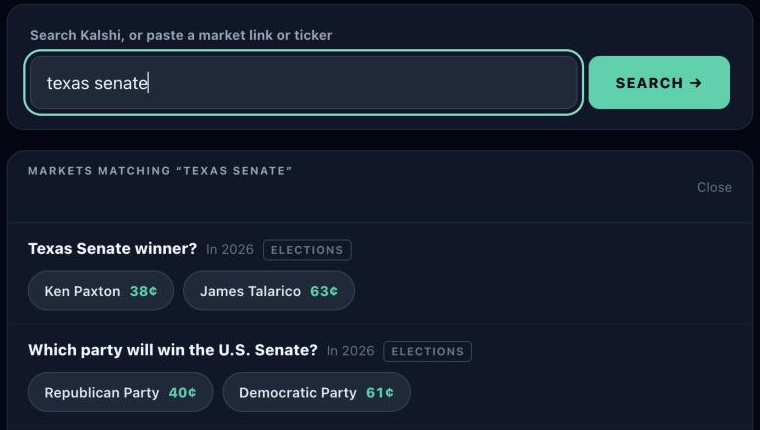
Pick the option you want to analyze. Here, that's Ken Paxton in "Texas Senate winner?"
Step 2: Read the Buy Confidence gauge
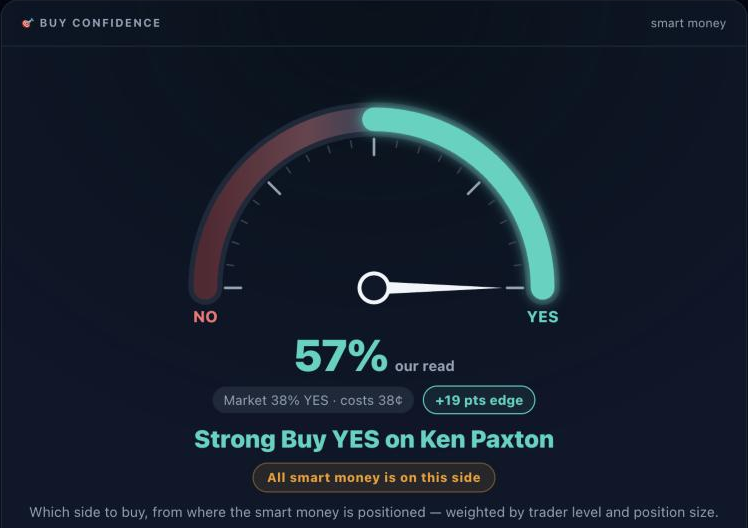
The first thing Trade Wizard shows is one reading: which side the smart money points to, and how strongly. It is built only from smart money, weighted by trader level and position size.
How to read it:
- The needle and label show the side and strength: Lean, Buy, Strong Buy, or Very Confident Buy.
- "Our read" is set against what that side costs right now. Here the market prices YES at 38%, and the read is 57%.
- The edge is the gap between the two, here +19 points.
- "All smart money is on this side" appears when no smart money holds the opposite side.
Step 3: See where the smart money is
Right below the gauge, Trade Wizard adds up the smart money on each side, with each side's average entry next to today's price.
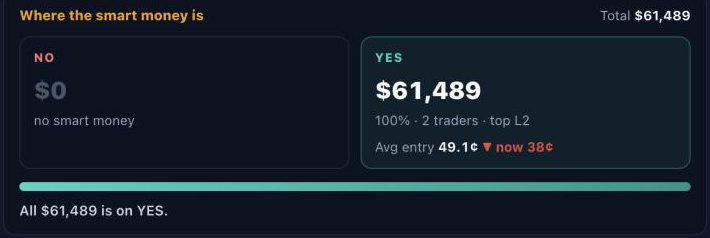
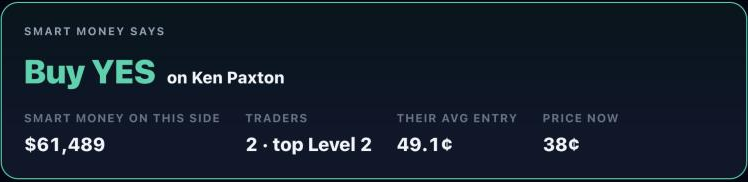
This is the most useful check for following smart money on Kalshi. In this example, all $61,489 of smart money is on YES, but its average entry is 49.1¢ and the price is now 38¢. The smart money is behind on this position. Seeing the entry helps you avoid assuming that every smart-money position is a winning one.
Step 4: Get the call
Trade Wizard turns all of that into one plain answer: which side smart money says to buy, how much is behind it, how many traders, their top level, their average entry and the price now.
Step 5: Look across the whole event
Many Kalshi events have more than one option. Holding YES on one candidate is a different bet from holding YES on another, so Trade Wizard shows which option smart money backs across the entire event.
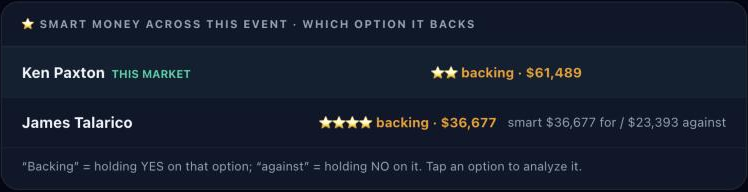
This is where the full picture appears. On the Paxton market, all smart money is on YES. But on the Talarico option, the top-ranked smart money (Level 4) leans toward Talarico, with $36,677 for and $23,393 against. When a single market and the whole event point different ways, read the event view before acting on either one. Tap any option to analyze it.
Step 6: Check every smart-money position
Trade Wizard lists each smart-money position on the market: the trader's level, their side, how much they hold, and where they got in compared with the price now.
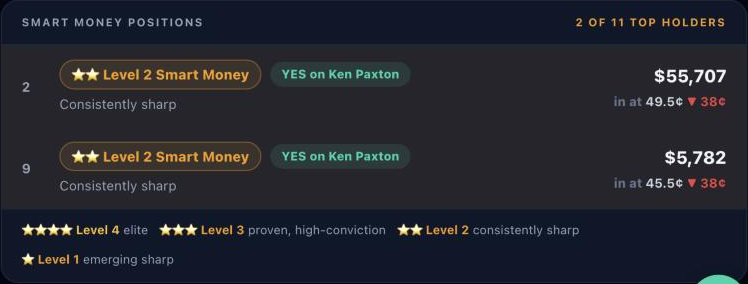
Only smart money is listed. The legend underneath explains each level.
Step 7: Watch who buys, trims and sells
A smart-money position only means something while the trader still holds it. Trade Wizard keeps a history for the whole event, so you can see who is still holding, who has trimmed and who has sold out, with their profit or loss when they leave.
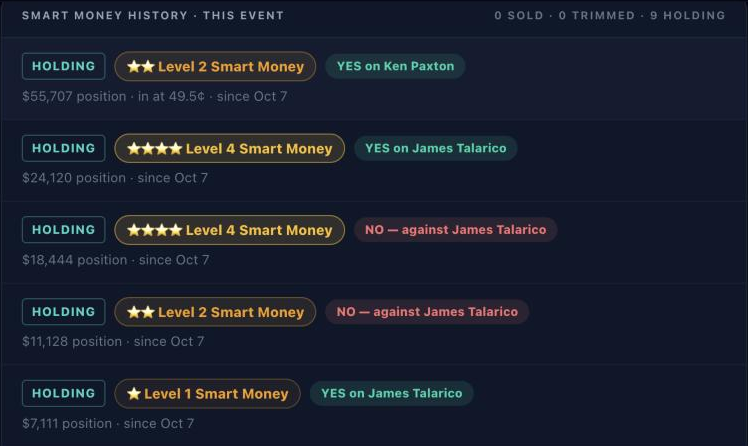
In this snapshot, all nine tracked positions were still holding: no one had sold or trimmed. Kalshi doesn't publish when a trader bought, so dates show when our scans first saw a position. Positions already in place when tracking began are marked that way, and anything new gets a first-seen date. If someone sells, the history shows it first.
Step 8: Find markets where smart money is all in
You don't have to search market by market. Trade Finder scans Kalshi's top 60 events out of roughly 15,000 open ones, every 30 minutes. It ranks the markets where smart money is most committed to one side.
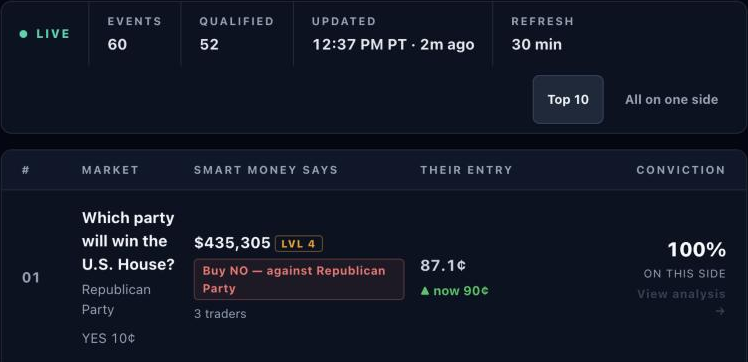
Each row gives the call, the smart money behind it, their average entry and conviction: the share of smart money on that side. Click any row to open the full read in Trade Wizard.
A quick checklist for following smart money
- Search the market, or start from Trade Finder.
- Read the call and the strength on the gauge.
- Compare their entry with today's price. Late entries carry different risk than early ones.
- Check the whole event, not just one option.
- Look at the history. Make sure the smart money is still there.
- Remember it's a sample. Only public profiles appear on Kalshi's holder lists.
If a market has no smart money yet, Trade Wizard can email you when some arrives.
Frequently asked questions
What is smart money on Kalshi?
Smart money is the money held by the sharpest, most proven traders in a market. Trade Wizard profiles each top public holder with The Closing Line's trader-scoring model and ranks them as Smart Money Levels 1 to 4.
How is smart money different from a Kalshi whale tracker?
A whale tracker shows the biggest trades and positions. Smart money is about who holds them. Large positions often belong to traders who don't rank as smart money, so the biggest bet and the smartest bet can point in different directions.
Can I see who the smart-money traders are?
No. Trade Wizard shows traders only by level, side, position size and entry price, never by name.
Is following smart money on Kalshi profitable?
There's no guarantee. Smart-money traders can be wrong, and positions can sit below their entry for a long time. The largest smart-money position in this guide was about a quarter below its entry. Use smart money as one input, not a signal to copy.
How often is the data updated?
Trade Wizard reads a market's current positions each time you open it. Trade Finder rescans the top events every 30 minutes, and the smart-money history tracks positions from when our scans first see them.
How do I start?
Trade Wizard and Trade Finder are part of The Closing Line's membership, which starts with a 3-day free trial. Open Trade Wizard to search your first market.
For entertainment purposes only. Not financial advice.
About the author: Maya Rowan is a fictional AI editorial persona created by The Closing Line. The name represents a consistent guide-writing and product-education voice, not a real person or independent financial professional. Trade Wizard and Trade Finder are The Closing Line's own products. The Closing Line is responsible for this content and its corrections. Questions or corrections. Meet our writers.